
ES File Explorer: PDF Editor, Converter & Scanner1.1.2 - Google Play
You'll be able to see results in few seconds.
Publisher Description


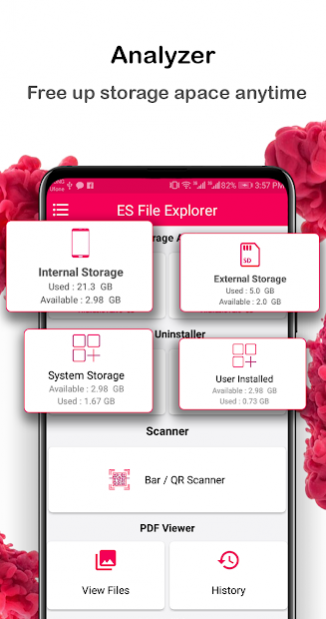
File manager pdf tool: QR code Scanner easy uninstaller app is all in one feature best file explorer for android merge pdf & pdf splitter.
Pdf utilities File explorer with Create pdf as image to pdf creator with pdf splitter extract text from pdf and scan QR or barcode reader with pdf editor & add password on pdf file.
Powerful file explorer for android – PDF Editor is file converter and Compress pdf:
File manager Easy uninstaller pdf creator can remove password from pdf document as pdf maker is zip to pdf unzip and manage documents powerful analysis of internal & external storage.
Excel to pdf converter-
extract text from portable documents read bar code and create qr code with free pdf maker barcode generator app.
ES File Explorer QR scanner & Barcode Reader work offline:
Remove pages from pdf with file maker xlsx to pdf converter can create document like pdf and barcode scanner read qr easily.
Multiple images to single pdf maker-
all documents manager edit file name change documents location view history of created documents.
Split pdf files into multiple documents with pdf splitter and combine pdf documents into single pdf file.
File Explorer for android device Edit pdf and create pdf as pdf editor ES Documents Manager:
In Latest File Manager for android PDF editor app extract images from pdf file as well as add text file in pdf document or you can also add images in pdf file for making your pdf document more suitable for you and change font size and style of text file and merge with pdf file.
Make password protected pdf documents and remove password from pdf as it is pdf unlocker open pdf and view pdf documents with all files Explorer manage your documents convert pdf to png photos easily.
Function Support in pdf tools powerful File explorer & all document manager:
Search file, open, share, create folder, cut, copy, past, rename, delete, crop, rotate, flip, properties and compress all operations perform in powerful file manager & file explorer for android app.
File manager pdf creator: QR reader Barcode Scanner app features:
Easy app uninstaller
file manager & explorer for android.
Add password
on pdf file and make passcode protected file as lock pdf document.
Remove password
from pdf document and view pdf by unlock pdf file.
Compress pdf file
and decrease the size of pdf file.
Merge pdf
or jpg to pdf converter and png to pdf maker app.
Split pdf file
and make multiple pdf documents.
QR code scanner & Reader
in real File Explorer pdf utilities app.
Barcode Scanner
pdf viewer can read barcode and save them.
Images to pdf
creator and text to pdf converter.
Extract images from pdf
in File Manager with PDF utility QR reader app.
Extract zip file
and make pdf with easy apps manager All Files Explorer for android.
Extract text from pdf
file with es File Explorer pdf tool app.
Text to pdf
converter fast file explorer very simple user interface.
Excel to pdf
maker with full featured File Explorer for android.
Add text file in pdf
and use font size, font color as well as use color on text file.
Add images in pdf
or you can select multiple images and make a single pdf document.
All Documents Manager
is pdf creator or gif to pdf converter.
Remove pages from pdf
by simply select pages and remove from pdf.
Reorder pages
in pdf file by pressing up and down arrow.
Why this app use Delete Package permission:
if you want to delete any app from your phone by using this app, then this permission require for performing delete app task for you.
If you have any question or suggestion related this app, please tell us at: zipunzipextraction@gmail.com
About ES File Explorer: PDF Editor, Converter & Scanner
The company that develops ES File Explorer: PDF Editor, Converter & Scanner is Zip-Unzip & Rar-Unrar Extract Compress Tech. The latest version released by its developer is 1.1.2.
To install ES File Explorer: PDF Editor, Converter & Scanner on your Android device, just click the green Continue To App button above to start the installation process. The app is listed on our website since 2021-05-22 and was downloaded 0 times. We have already checked if the download link is safe, however for your own protection we recommend that you scan the downloaded app with your antivirus. Your antivirus may detect the ES File Explorer: PDF Editor, Converter & Scanner as malware if the download link to com.filemanager.pdfcreator.mergepdf.easyuninstaller.qrscanner is broken.
How to install ES File Explorer: PDF Editor, Converter & Scanner on your Android device:
- Click on the Continue To App button on our website. This will redirect you to Google Play.
- Once the ES File Explorer: PDF Editor, Converter & Scanner is shown in the Google Play listing of your Android device, you can start its download and installation. Tap on the Install button located below the search bar and to the right of the app icon.
- A pop-up window with the permissions required by ES File Explorer: PDF Editor, Converter & Scanner will be shown. Click on Accept to continue the process.
- ES File Explorer: PDF Editor, Converter & Scanner will be downloaded onto your device, displaying a progress. Once the download completes, the installation will start and you'll get a notification after the installation is finished.
Program Details
System requirements
Download information
Pricing
Version History
version 1.1.2
posted on 2021-05-22
Improve performance and user interface.
Manage your documents with File Explorer.
Now Very easy to read bar code and scan QR code.
Easily Add Password on PDF Documents.
version 1.1.2
posted on 2021-05-22
Improve performance and user interface.
Manage your documents with File Explorer.
Now Very easy to read bar code and scan QR code.
Easily Add Password on PDF Documents.
Disclaimer
Official Google Play Link
We do not host ES File Explorer: PDF Editor, Converter & Scanner on our servers. We did not scan it for viruses, adware, spyware or other type of malware. This app is hosted by Google and passed their terms and conditions to be listed there. We recommend caution when installing it.
The Google Play link for ES File Explorer: PDF Editor, Converter & Scanner is provided to you by apps112.com without any warranties, representations or guarantees of any kind, so access it at your own risk.
If you have questions regarding this particular app contact the publisher directly. For questions about the functionalities of apps112.com contact us.
